
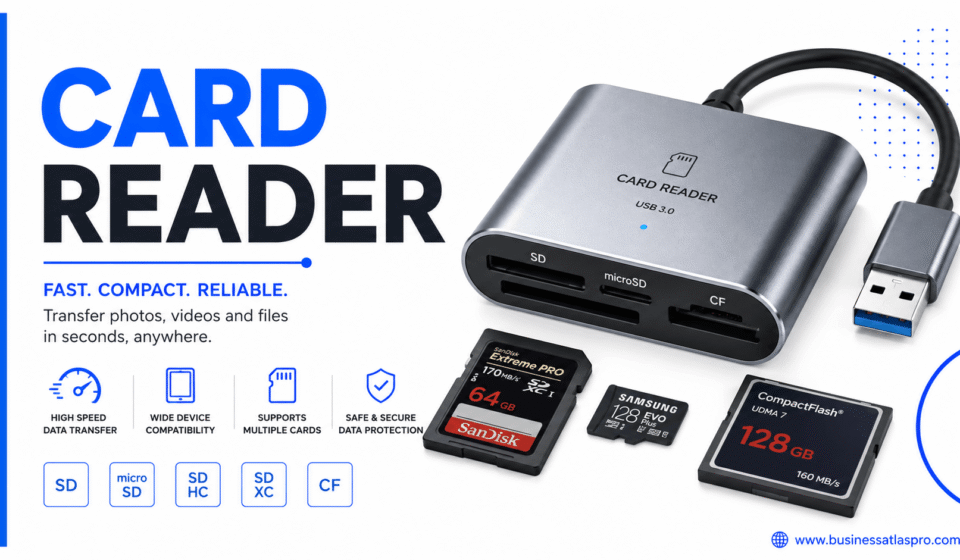

Most people don’t think about a card reader until they suddenly need one. Maybe your laptop doesn’t have an SD card slot. Maybe you’re setting up a small business and need to accept payments. Either way, understanding what a card reader actually does makes picking the right one a lot easier.
Let’s break it down properly.
What a Card Reader Is and How It Works
A card reader is a device that reads data from a card. Simple enough. But the card in question could be a memory card, a credit card, a debit card, or even an ID card. The category is broader than most people realize.
For memory cards, the reader connects to your computer or phone. It accesses the files stored on the card — photos, videos, documents — and transfers them to your device. No cables from a camera required.
For payment cards, it’s different. A card reader captures your card’s data and sends it to a payment processor. That processor checks with your bank. The transaction is approved or declined in seconds.
Both types rely on one core idea. They bridge data stored on a card to a system that can use it. The method differs — magnetic stripes, chips, or NFC technology — but the goal is the same.
And the hardware itself is usually small. Most card readers are compact enough to fit in a pocket or a laptop bag without any fuss.
Types of Card Reader Devices Worth Knowing
There are more categories here than most buyers expect. Knowing the differences saves you from buying the wrong thing.
Memory Card Readers
These are what photographers and videographers rely on. You pull the SD card from your camera and slot it into the reader. Your computer sees it like a USB drive.
Most support multiple card formats. SD, microSD, CompactFlash, and CFexpress are the common ones. If you shoot with different cameras, a multi-slot reader saves a lot of hassle.
USB-A readers are the most common. But USB-C versions are now standard for newer laptops. Check your ports before buying.
Payment Card Readers
These are what small businesses and market vendors use. You’ve probably seen the little dongle that plugs into a phone’s headphone jack. Or the countertop terminal at a coffee shop.
There are three main subtypes here. Magnetic stripe readers swipe the card. Chip readers insert the card and read the EMV chip. Contactless readers tap the card using NFC.
Modern payment card readers usually support all three. That matters because chip and contactless payments are more secure than magnetic stripe.
Smart Card Readers
These read cards embedded with a microchip — not a payment chip, but a full smart card. Government IDs, employee access badges, and SIM cards fall into this category.
Banks and government agencies use them most often. But they’re also relevant if you work in IT security or need to authenticate into a secured system.
Choosing the Right Card Reader for Your Needs
This is where most people get stuck. The options look similar but serve different purposes. Here’s how to think through it.
What kind of card are you reading? Start here. A memory reader won’t process a payment. A payment card reader won’t pull photos off an SD card. These are distinct tools.
What connection type does your device support? USB-A, USB-C, Lightning, and wireless are the main options. Most modern readers come with adapters or multiple connectors. But double-check before assuming.
Do you need speed? For memory cards, read and write speed matters if you’re transferring large video files. Look for USB 3.0 or higher for faster transfers. USB 2.0 is noticeably slower with big files.
What’s your budget? A basic SD card reader costs a few dollars. A quality multi-format reader runs $20–$50. Payment card readers from established providers are often free with a service subscription but charge transaction fees.
Card Reader Options for Small Businesses
If you’re running a small business, the payment card reader market has a few dominant players. Each has trade-offs.
Square offers a free basic card reader and charges a flat percentage per transaction. It’s simple, reliable, and works well for low-volume sellers.
Stripe is more developer-friendly and suits businesses that want custom integrations. Their card reader hardware is sleek and functional.
PayPal Zettle is another solid option, especially if you already use PayPal for online payments. It connects your in-person and online sales in one dashboard.
In my experience, Square is the easiest starting point for first-timers. The app is intuitive and setup takes minutes. But if your volume grows, comparing transaction fees across providers becomes worth the time.
Card Reader Security: What You Should Know
Security is a real concern here. Especially with payment card readers.
Skimming is the biggest physical threat. A skimmer is a fake reader placed over a legitimate one to steal card data. ATMs and fuel pumps are common targets. Always wiggle the card reader before using one at an unfamiliar location. Loose or misaligned hardware is a red flag.
For your own reader hardware, buy directly from the manufacturer or an authorized retailer. Third-party sellers on open marketplaces have occasionally shipped tampered hardware.
Chip-based transactions are significantly safer than magnetic stripe. The EMV chip generates a unique code for each transaction. That code can’t be reused. So even if stolen, the data is worthless for fraud.
The PCI Security Standards Council sets the global rules for payment card security. Any reputable reader for business use should be PCI-compliant. That’s not optional — it’s the baseline.
Common Card Reader Problems and Quick Fixes
Even good hardware runs into issues. Here are the ones that come up most often.
Card not recognized: Clean the card’s contacts. Dust and fingerprints cause most read errors. A soft dry cloth works fine. For chip cards, try reinserting slowly.
Reader not detected by computer: Try a different USB port. Try a different cable if it’s not built-in. Check device manager on Windows for driver issues. On Mac, restart with the reader plugged in.
Slow transfer speeds: Check if you’re using a USB 3.0 port with a USB 3.0 reader. A USB 3.0 reader in a USB 2.0 port drops to 2.0 speeds. This catches a lot of people off guard.
Payment card reader won’t connect: Update the app. Check Bluetooth pairing if it’s a wireless model. And check that location permissions are enabled — some payment apps require it.
Most issues are minor. A card reader is hardware, and hardware responds to basic troubleshooting.
Card Reader for Photography: A Closer Look
Photographers probably interact with card readers more than any other group. And the stakes are higher — you’re dealing with irreplaceable images.
Speed matters here. A professional shooting RAW files or 4K video deals with large file sizes. Moving 64GB from a card to a computer takes noticeably longer on a slow reader.
Look for a reader that matches your card’s rated speed. If you’re using a UHS-II SD card, get a UHS-II compatible reader. Using a UHS-I reader with a UHS-II card caps your transfer at the lower speed.
Multi-slot readers are convenient but can sometimes limit speeds per slot when multiple cards are inserted simultaneously. For high-speed single-card transfers, a dedicated single-slot reader often performs better.
And always eject the card properly before removing it. Don’t just pull it out. Improper ejection can corrupt data. This seems obvious, but it’s a habit worth forming early.
When a Card Reader Is Better Than a Cable
People often ask whether they even need a card reader. Can’t they just plug the camera into the computer directly?
Yes, you can. But a card reader is usually faster. Camera-to-computer transfers via cable use the camera’s own processing power. A dedicated card reader connects the storage directly to your USB port. That removes the bottleneck.
It’s also easier on the camera. You’re not draining the camera’s battery during transfer. And you’re not tying up the camera while files copy.
So for regular use — especially if you’re offloading footage frequently — a card reader earns its place. It’s a small tool that genuinely speeds up your workflow.
The right card reader depends entirely on what you need it for. Memory or payments. Speed or simplicity. One format or many. Once you’ve answered those questions, the choice gets clear fast. And whichever type you land on, you’ll wonder how you managed without one.
Also Read: Tennis Ball Tennis: What Every Player Should Know